Logitech Harmony 200 Fjernbetjening
Slutter 3 nov. 21:38
120 DKK
127 DKK med køberbeskyttelse.
Forsendelsespriser til Danmark
48 DKK PostNord Agent
77 DKK DHL
93 DKK GLS via DSV
Samlet fragt
1 dagKan afhentes i
Alle betalinger gennemgås af Tradera for din sikkerhed.


Direkte betaling
Køberbeskyttelse gælder alle betalingsmetoder
1/0
Beskrivelse
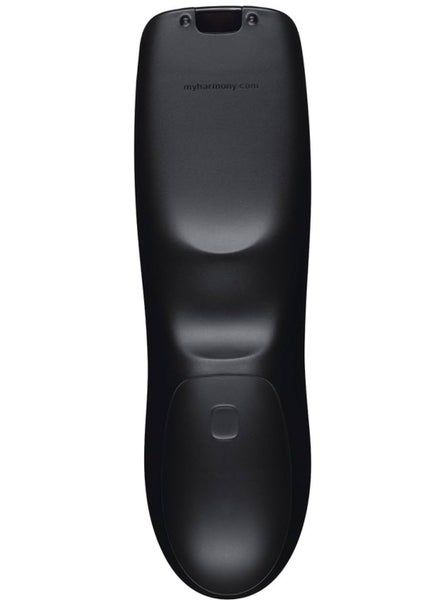
Logitech Harmony 200 universal fjernbetjening. Disse fjernbetjeninger var designet til at forenkle dit hjemmeunderholdningssystem ved at styre flere enheder (op til 3 eller 4) med en enkelt enhed.
Her er en hurtig guide til, hvordan du kommer i gang, og hvad denne fjernbetjening kan gøre.
1. Opsætning og programmering
I modsætning til "lærende" fjernbetjeninger, der kræver, at du peger din gamle fjernbetjening mod den nye, bruger Logitech Harmony fjernbetjeninger en webbaseret database.
• Software: Du skal typisk besøge myharmony.com (som trykt på bagsiden af din fjernbetjening) for at downloade desktop-softwaren.
• Forbindelse: Kig inde i batterirummet; der er normalt en Micro-USB-port. Du forbinder fjernbetjeningen til din computer for at synkronisere din enhedsliste (TV, kabelboks, DVD-afspiller osv.).
• Database: Logitech understøtter over 225.000 enheder, så selv ældre eller obskure mærker fungerer normalt.
2. Nøglefunktioner
• "Se TV"-knap: Dette er den gule knap øverst til venstre. Det er en "smart" knap. Når den er programmeret, kan et tryk på den tænde for dit TV og din kabelboks samtidigt.
• Enhedsknapper: De hvide knapper (TV, CABLE, DVD) giver dig mulighed for at skifte, hvilken enhed fjernbetjeningen i øjeblikket styrer.
• "Glow": Selvom disse modeller er entry-level, er de kendt for deres ergonomiske form ("puklen" på bagsiden), som gør dem meget behagelige at holde.
Her er en hurtig guide til, hvordan du kommer i gang, og hvad denne fjernbetjening kan gøre.
1. Opsætning og programmering
I modsætning til "lærende" fjernbetjeninger, der kræver, at du peger din gamle fjernbetjening mod den nye, bruger Logitech Harmony fjernbetjeninger en webbaseret database.
• Software: Du skal typisk besøge myharmony.com (som trykt på bagsiden af din fjernbetjening) for at downloade desktop-softwaren.
• Forbindelse: Kig inde i batterirummet; der er normalt en Micro-USB-port. Du forbinder fjernbetjeningen til din computer for at synkronisere din enhedsliste (TV, kabelboks, DVD-afspiller osv.).
• Database: Logitech understøtter over 225.000 enheder, så selv ældre eller obskure mærker fungerer normalt.
2. Nøglefunktioner
• "Se TV"-knap: Dette er den gule knap øverst til venstre. Det er en "smart" knap. Når den er programmeret, kan et tryk på den tænde for dit TV og din kabelboks samtidigt.
• Enhedsknapper: De hvide knapper (TV, CABLE, DVD) giver dig mulighed for at skifte, hvilken enhed fjernbetjeningen i øjeblikket styrer.
• "Glow": Selvom disse modeller er entry-level, er de kendt for deres ergonomiske form ("puklen" på bagsiden), som gør dem meget behagelige at holde.
Køb mere og spar på fragten
Samlet fragt
1 dag Sluttid3 nov. 21:08.Pris:335 DKK,Køb nu.
 Sluttid3 nov. 21:09.Pris:335 DKK,Køb nu.
 Sluttid3 nov. 21:11.Pris:362 DKK,Køb nu.


Andre har også set påVis alle
- Pris:.
- Pris:.
- Pris:.
- Pris:.